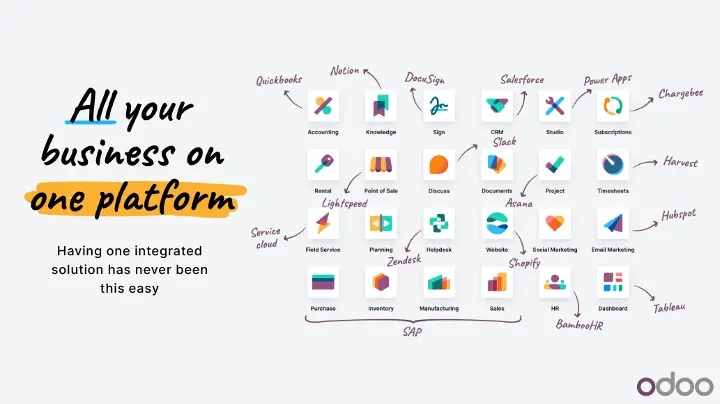
Odoo ERP is an integrated business management platform that brings different business functions into one system. It includes applications for accounting, sales, CRM, inventory, purchasing, manufacturing, human resources, project management, eCommerce, marketing, point of sale, website management, and several other business processes.
Odoo is built around a modular approach. Instead of requiring a business to implement every application at once, organizations can start with the applications they need and add more applications as their requirements change. Odoo describes its platform as a suite of open source business applications designed to cover a wide range of company needs while keeping the applications integrated.
This guide explains what Odoo ERP is, how it works, its main applications, Odoo editions, hosting options, pricing, advantages, limitations, and common questions businesses have when evaluating Odoo.
What Is Odoo ERP?
Odoo ERP is an enterprise resource planning platform that combines business applications into a single software ecosystem. An ERP system is designed to connect core business processes and provide a central place for managing business data.
In Odoo, applications can work together across different departments. For example, a sales process can connect CRM opportunities with quotations, sales orders, inventory operations, invoices, and payments. Similarly, a manufacturing process can connect sales demand with procurement, inventory, production, quality, maintenance, and accounting.
The main idea behind Odoo is integration. Instead of maintaining completely separate systems for each department, businesses can use connected Odoo applications that share data and workflows.
How Does Odoo ERP Work?
Odoo uses applications to manage different areas of a business. Each application focuses on a particular business function, while the applications can interact with one another.
For example, a product-based company could use the following workflow:
CRM → Sales → Inventory → Purchase → Accounting
A manufacturing company could extend the workflow:
CRM → Sales → Manufacturing → Inventory → Purchase → Quality → Accounting
A service company could use:
CRM → Sales → Project → Timesheets → Invoicing
This modular structure means that an organization does not necessarily need to deploy every Odoo application from the beginning.
What Are the Main Odoo ERP Applications?
Odoo includes applications covering many areas of business management. The exact applications and features available can vary by Odoo edition and version.
Odoo CRM
Odoo CRM is used to manage leads, opportunities, sales pipelines, activities, customer interactions, and sales forecasting.
Common CRM functions include:
- Lead management
- Opportunity management
- Sales pipelines
- Activities and follow-ups
- Customer information
- Sales forecasting
- Lead scoring
- Reporting and analysis
CRM can also connect with Odoo Sales so that opportunities can move into quotations and sales orders.
Odoo Sales
Odoo Sales manages the sales process from quotation creation through sales orders and related operations.
It can be used for:
- Quotations
- Sales orders
- Pricelists
- Customer management
- Product configuration
- Online payments
- Electronic signatures
- Invoicing workflows
- Sales reporting
Because Sales can connect with Inventory and Accounting, an order can continue through delivery and invoicing without requiring the same information to be entered repeatedly in different systems.
Odoo Accounting
Odoo Accounting provides tools for financial management and accounting operations.
Depending on the configuration and localization, it can support:
- Customer invoices
- Vendor bills
- Payments
- Bank synchronization
- Bank reconciliation
- Taxes
- Financial reporting
- Analytic accounting
- Multi-company accounting
- Budgeting and financial analysis
Accounting can also be connected with Sales, Purchase, Inventory, and other applications.
Odoo Inventory
Odoo Inventory is used to manage stock and warehouse operations.
Its functionality includes:
- Warehouses
- Storage locations
- Inventory adjustments
- Stock movements
- Replenishment
- Product tracking
- Lots and serial numbers
- Expiration dates
- Inventory routes
- Barcode operations
- Multi-warehouse management
Inventory can connect directly with Purchase, Sales, Manufacturing, and Accounting.
Odoo Purchase
Odoo Purchase manages procurement and vendor-related processes.
It includes functions for:
- Requests for quotation
- Purchase orders
- Vendors
- Vendor pricelists
- Purchase agreements
- Reordering
- Procurement analysis
Purchase can work with Inventory to manage incoming goods and with Accounting to process vendor bills.
Odoo Manufacturing
Odoo Manufacturing, also known as MRP, is designed for manufacturing operations.
Manufacturing functionality includes:
- Bills of Materials
- Manufacturing orders
- Work orders
- Work centers
- Production planning
- Master Production Schedule
- Subcontracting
- Shop Floor
- Quality integration
- Maintenance integration
- Manufacturing analysis
This allows manufacturing operations to connect production requirements with inventory, procurement, sales, quality, and other processes.
Odoo Human Resources
Odoo includes several applications for human resource management.
These can include:
- Employees
- Recruitment
- Time Off
- Attendances
- Appraisals
- Payroll
- Referrals
- Fleet
- Employee documents
Organizations can choose the HR applications that match their requirements.
Odoo Project
Odoo Project helps manage projects, tasks, milestones, activities, dependencies, and project profitability.
It can be used by service companies, internal teams, agencies, consulting organizations, software teams, and other businesses that manage work through projects.
Odoo Timesheets
Odoo Timesheets allows employees to record time against projects and tasks.
Timesheet information can be connected with project management and invoicing workflows, depending on the business configuration.
Odoo Helpdesk
Odoo Helpdesk provides tools for managing customer support requests and service tickets.
Businesses can organize support tickets, assign them to teams, track activities, monitor service performance, and connect support activities with other Odoo applications.
Odoo eCommerce
Odoo eCommerce allows businesses to operate online stores within the Odoo ecosystem.
It can connect:
Website → eCommerce → Sales → Inventory → Delivery → Accounting
This integration allows online orders to become part of the same business workflow used for other sales channels.
Odoo Website
Odoo Website provides tools for creating and managing websites.
It can be used together with eCommerce, blogs, forms, events, customer portals, and other Odoo applications.
Odoo Point of Sale
Odoo Point of Sale is designed for retail stores, restaurants, and other businesses that process transactions at physical locations.
POS can connect with products, inventory, customers, payments, sales, and accounting.
Odoo Marketing
Odoo provides several marketing applications, including:
- Email Marketing
- SMS Marketing
- Social Marketing
- Marketing Automation
- Events
- Surveys
These applications can use customer and business information from other parts of the Odoo database.
Odoo Services Applications
Odoo also provides applications for different service and productivity requirements, including:
- Field Service
- Planning
- Appointments
- Documents
- Sign
- Knowledge
- Approvals
- Discuss
- Calendar
- Dashboards
- Spreadsheet
The available applications make Odoo broader than a conventional ERP focused only on finance, inventory, and manufacturing.
What Are the Main Benefits of Odoo ERP?
Integrated Business Processes
One of Odoo’s main characteristics is that its applications are designed to work together.
For example, a sales order can affect inventory and generate an invoice. A purchase order can result in a receipt and vendor bill. A manufacturing order can consume components and produce finished goods.
This reduces the need to manually transfer information between unrelated systems.
Modular Structure
Odoo’s modular structure allows businesses to select applications according to their requirements.
A small company might begin with CRM and Sales. It can later introduce Inventory, Purchase, Accounting, HR, Manufacturing, or other applications.
This approach can make ERP adoption more gradual.
Open Source
Odoo has an open source Community edition, while Enterprise provides additional functionality and services.
Odoo explains that the Enterprise edition is built on the Community edition and provides additional features. The exact differences depend on the Odoo version and application.
Customization
Odoo can be customized depending on the edition and hosting environment.
Customization can involve configuration, Odoo Studio, custom modules, integrations, and API-based development.
However, customization should be evaluated carefully because extensive custom code can affect maintenance, upgrades, and long-term system complexity.
Broad Application Coverage
Odoo covers many business functions within one ecosystem. This can reduce the number of separate software systems required by an organization.
The current Odoo pricing page lists applications including Sales, eCommerce, Sign, Website, Accounting, CRM, Inventory, HR, Project, POS, Purchase, Marketing, Planning, Timesheets, Helpdesk, Events, Manufacturing, and Rental, among others.
Odoo Community vs Odoo Enterprise
Odoo is available in Community and Enterprise editions.
Odoo Community
Community is the open source edition of Odoo. It provides the open source foundation and includes a range of business applications.
It is generally relevant for organizations that have the technical resources to manage their own Odoo environment and requirements.
Odoo Enterprise
Enterprise provides additional applications, features, services, and commercial functionality.
The exact feature differences change over time, so the official Odoo edition information should be checked when comparing the two editions.
What Is Odoo Online?
Odoo Online is Odoo’s cloud-hosted environment.
It is designed for organizations that want to use Odoo without managing their own server infrastructure.
Odoo Online is particularly suited to standard Odoo functionality. Odoo’s pricing information states that the Standard plan uses Odoo Online and that Odoo Online does not support custom modules.
What Is Odoo.sh?
Odoo.sh is Odoo’s cloud platform for hosting Odoo environments that may require custom development.
It supports development, staging, and production branches and can be used when custom modules are part of an Odoo environment.
Odoo’s current pricing information identifies Odoo.sh as an option under the Custom plan, with the hosting cost separate from the standard subscription price.
What Is Odoo On-Premise?
An on-premise Odoo deployment means that the Odoo software is hosted on infrastructure managed by the organization or its infrastructure provider.
This approach can provide greater control over the hosting environment, but it also means that infrastructure management, security, backups, updates, and system administration need to be addressed separately.
How Much Does Odoo Cost?
Odoo pricing depends on the plan, number of users, hosting requirements, applications, and additional requirements.
According to Odoo’s current pricing page, the main plans are:
| Plan | Current listed price | Main offering |
|---|---|---|
| One App Free | $0 | One app, unlimited users, Odoo Online |
| Standard | $24.90 per user/month when billed yearly | All apps, Odoo Online |
| Custom | $49 per user/month when billed yearly | All apps, Odoo Online, Odoo.sh or on-premise options, Studio, multi-company, and external API |
The prices above are based on Odoo’s current published pricing and can change. Odoo also lists different monthly pricing and conditions, so the official pricing page should be checked before making a purchasing decision.
The subscription price should not automatically be treated as the total cost of an Odoo project.
Additional costs can depend on requirements such as:
- Implementation
- Business analysis
- Data migration
- Custom development
- Third-party integrations
- Training
- Odoo.sh hosting
- Custom-code maintenance
- Additional services
Odoo explicitly states that implementation services are separate from the subscription plans.
Is Odoo ERP Free?
Odoo does have a free plan.
The current One App Free plan is listed at $0 and provides one application with unlimited users on Odoo Online. If an application requires dependent applications, those dependencies are also included for the selected free application.
However, businesses requiring multiple applications, additional functionality, custom development, or other Enterprise features may need a paid plan.
How Is Odoo ERP Implemented?
Odoo implementation generally involves more than installing the software.
A typical implementation process can include:
1. Requirements Analysis
Business processes are reviewed to understand how departments currently operate and what the ERP needs to accomplish.
2. Application Selection
The appropriate Odoo applications are identified based on business requirements.
3. Process Design
Existing workflows are mapped against standard Odoo functionality.
4. Configuration
The database is configured for users, permissions, products, warehouses, taxes, accounting, workflows, and other requirements.
5. Data Migration
Existing data can be prepared and imported into Odoo.
Typical migration data may include:
- Customers
- Vendors
- Products
- Opening balances
- Inventory
- Pricelists
- Employees
- Historical records where required
6. Customization and Integration
If standard functionality does not meet a specific requirement, customization or integration may be considered.
7. Testing
Business workflows should be tested from beginning to end.
For example:
Quotation → Sales Order → Delivery → Invoice → Payment
or:
Purchase Order → Receipt → Vendor Bill → Payment
8. User Training
Users need to understand the applications and workflows relevant to their roles.
9. Go-Live
Once configuration, migration, testing, and training are complete, the production system can be brought into operation.
10. Ongoing Maintenance
After go-live, organizations may need to manage updates, upgrades, configuration changes, integrations, data quality, and custom code.
What Factors Affect Odoo Implementation Cost?
There is no single Odoo implementation cost that applies to every business.
Important factors include:
- Number of users
- Number of applications
- Business complexity
- Number of companies
- Data migration requirements
- Existing software
- Customization requirements
- Third-party integrations
- Accounting and localization requirements
- Manufacturing complexity
- Reporting requirements
- Training requirements
- Hosting model
For example, implementing CRM and Sales for a small organization is very different from implementing Manufacturing, Inventory, Accounting, Purchase, Quality, Barcode, and multiple integrations for a large manufacturing organization.
Is Odoo Suitable for Small Businesses?
Odoo can be used by small businesses because its applications can be introduced according to business requirements.
A small business might use:
CRM + Sales + Invoicing
and later add:
Inventory + Purchase + Accounting + eCommerce
The modular approach allows businesses to expand the system as their processes become more complex.
Is Odoo Suitable for Manufacturing?
Odoo includes dedicated manufacturing functionality, making it applicable to many manufacturing workflows.
Manufacturing can connect with:
- Inventory
- Purchase
- Sales
- Quality
- Maintenance
- PLM
- Accounting
A manufacturing workflow could look like:
Sales Demand → Procurement → Raw Material Inventory → Manufacturing → Quality → Finished Goods → Delivery → Accounting
The exact suitability depends on the complexity of the manufacturing operation and the required processes.
Is Odoo Suitable for Service Businesses?
Odoo can also be used for service-oriented organizations.
A service company may combine:
CRM → Sales → Project → Timesheets → Planning → Helpdesk → Invoicing
This allows customer acquisition, sales, service delivery, time tracking, and billing to be connected within one system.
Odoo ERP for Indian Businesses
Odoo can be used by organizations operating in India, but the configuration needs to reflect the organization’s accounting, taxation, invoicing, reporting, and operational requirements.
Indian businesses may need to consider areas such as:
- GST
- Tax configuration
- Invoicing
- Accounting
- Inventory
- eCommerce
- Multi-company operations
- Local business processes
- Applicable integrations
The exact configuration depends on the organization’s industry, transaction model, legal structure, and operational requirements.
What Are the Advantages of Odoo ERP?
The main advantages of Odoo include:
- Integrated applications
- Modular architecture
- Open source foundation
- Broad business functionality
- Flexible deployment options
- Customization possibilities
- Accounting and financial management
- Inventory and manufacturing capabilities
- CRM and sales management
- Website and eCommerce integration
- HR and project management
- Marketing and customer service applications
The combination of these applications allows organizations to build a connected business management environment instead of relying entirely on separate applications for every department.
What Are the Limitations of Odoo ERP?
Odoo also has considerations that organizations should evaluate before implementation.
Implementation Complexity
A simple Odoo database may be relatively straightforward, but complex ERP projects can involve significant process analysis, configuration, migration, testing, and training.
Customization Risk
Customization can help meet specific requirements, but excessive custom development can increase maintenance requirements and make future upgrades more complicated.
Data Migration
Moving inaccurate, duplicated, or poorly structured data into a new ERP can create problems. Data should be cleaned and validated before migration.
User Adoption
ERP systems affect daily workflows across departments. Users need appropriate training and clear processes for successful adoption.
Hosting Considerations
The choice between Odoo Online, Odoo.sh, and on-premise deployment affects what can be customized and how the environment is managed.
[oa_faqs title=”Frequently Asked Questions About Odoo ERP”]
[/oa_faqs]
Conclusion
Odoo ERP is an integrated business management platform that combines applications for finance, sales, CRM, inventory, purchasing, manufacturing, human resources, projects, eCommerce, marketing, customer service, and other business functions.
Its modular architecture allows organizations to select applications according to their requirements, while its integrated approach connects information between different departments.
The right Odoo setup depends on factors such as business processes, company size, industry, applications required, data structure, customization needs, hosting preferences, and budget.
For anyone researching Odoo ERP, the most important areas to evaluate are not only the list of available applications but also how those applications fit together, what functionality is available in each edition, how the system will be hosted, what customization is required, and what the total cost of ownership will be.
Odoo’s official pricing, documentation, and product information should be checked regularly because application features, pricing, supported versions, and hosting options can change over time.